Swyqalen
Anchor Module
Anchor Module
Couldn't load pickup availability
-
Problem Statement
As Swift study becomes wider, learners often need more than short syntax examples. They may understand values, functions, conditions, collections, and simple data models, but still feel unsure when those ideas appear inside one longer flow. A learner may also know what each separate part does, yet find it difficult to decide how to arrange code in a clean order. This can make practice feel uneven, because the learner is not only writing lines of code but also making choices about structure. Anchor Module was created for learners who want more organized guidance on how Swift ideas can be connected, reviewed, and used in practical study tasks. -
Solution
Anchor Module gives learners a deeper Swyqalen course tier focused on steady structure, reusable sections, data flow, and guided practice. The materials explain each topic in plain written form, then show examples with side notes, then move into tasks that ask learners to read, complete, and adjust short Swift samples. This tier places more attention on how information moves through code, how grouped data can be handled, and how small coding decisions affect readability. The course also uses recap pages and self-check notes so learners can return to earlier concepts when needed. Anchor Module is made for learners who want a more developed study path without being pushed into overly complex material too soon. -
What’s Inside
Anchor Module includes a detailed collection of Swift learning materials arranged around structure, data handling, and practical code review. The course begins with a short orientation section that explains how the materials are arranged and how learners can move through each part. This opening section encourages a steady study rhythm: read the concept, review the annotated example, complete the task, then return to the recap notes for review.
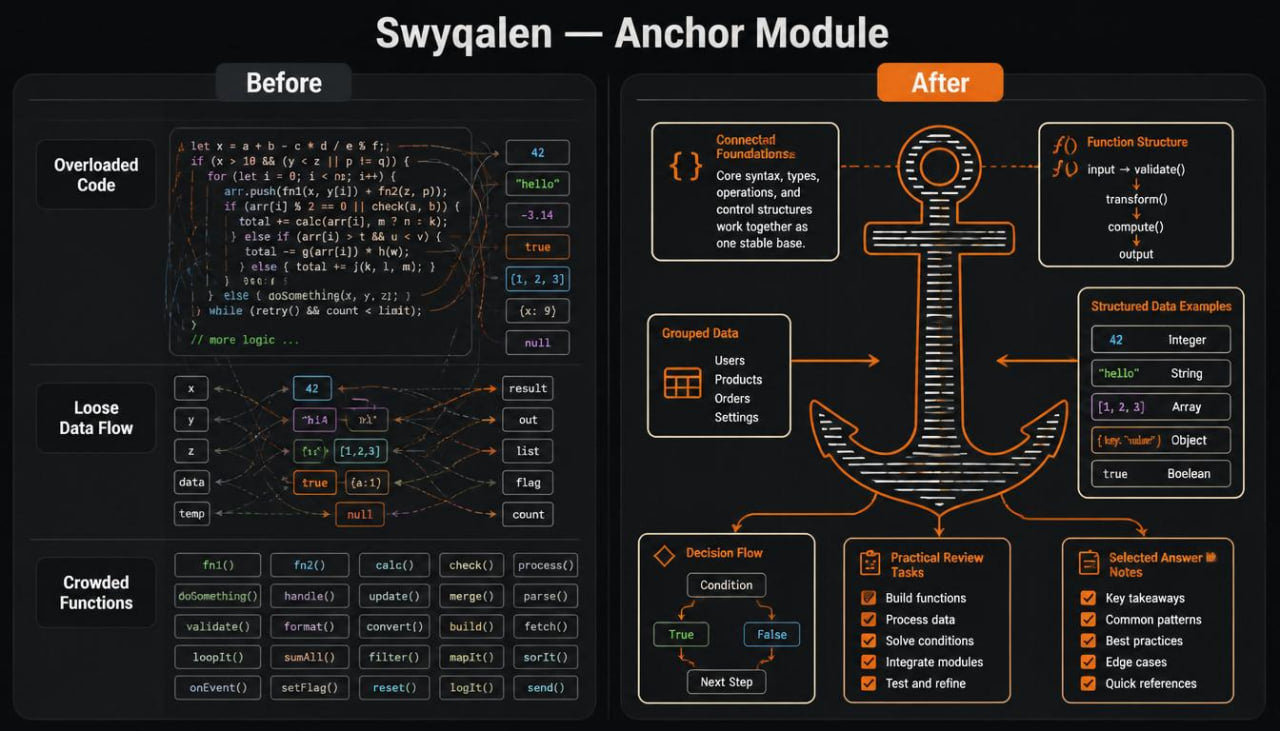
The first section revisits Swift foundations through connected examples. Instead of treating values, variables, constants, conditions, loops, functions, and collections as separate topics, this section shows how they work together in short code flows. Learners review how a value is created, how it moves into a function, how a condition checks it, and how the final result is formed.
The second section focuses on function structure. Learners study how functions can be named, how parameters can be chosen, and how return values can make code easier to review. The examples include small groups of functions that work together. One function may prepare information, another may check a condition, and another may return a formatted result. Practice tasks ask learners to label each function part, complete missing code, and explain the flow in plain language.
The third section covers grouped data. Learners review collections, simple list handling, repeated actions, and small filtering patterns. This section explains how grouped values can be reviewed one by one, how a condition can be applied to each value, and how a final list or result can be formed. The examples include notes beside each step so learners can understand why a line appears where it does.
The fourth section introduces structured data examples. Learners study how related information can be placed into small data models. The course explains how fields are named, how sample values are created, and how those values can be used inside functions and collections. This section is helpful for learners who want to understand how Swift code can describe information in an organized way.
The fifth section focuses on decision flow. Learners review condition blocks, fallback paths, comparison logic, and readable branching. The examples show different outcomes based on different values. Learners also practice rewriting unclear condition sections into a cleaner order.
The sixth section adds practical review tasks. These tasks combine functions, collections, data models, and conditions into guided exercises. Each task begins with a short scenario and a planning note. Then learners work with a partially completed code sample and finish missing parts. Selected answer notes are included for self-checking.
The seventh section brings the course together through recap pages, glossary notes, and mixed review examples. Learners can return to this section after completing the course to review key patterns, repeated terms, naming habits, data flow, and common Swift structures.
Anchor Module also includes practice files, short reading prompts, selected answer notes, and organized study resources. The course is written for learners who want to spend more time understanding how Swift code is shaped, not only what each term means.
-
Who Is This For?
Anchor Module is for learners who already understand early Swift topics and want to study more connected examples. It is suitable for learners who have worked with values, functions, conditions, loops, collections, and small data models, but want more practice bringing those ideas together.
This tier is also for learners who prefer written study materials with a calm and organized format. It fits people who like reading explanations, reviewing annotated examples, completing practice tasks, and returning to recap pages after each section.
Anchor Module may also be useful for learners who feel comfortable with short code samples but want more guidance when examples become more layered. The course does not attempt to cover every Swift topic. Instead, it focuses on structure, data flow, reusable patterns, and careful review.
- What You’ll Learn
- How Swift foundations connect inside longer study examples
- How values move through functions and conditions
- How to choose clear names for values and functions
- How parameters help pass information into reusable sections
- How return values help carry information out of a function
- How grouped data can be reviewed through collections
- How repeated actions can be written in a readable pattern
- How small filtering tasks can be arranged
- How structured data can describe related information
- How data models can be used with functions and collections
- How condition blocks can guide different outcomes
- How fallback paths can be written with care
- How to read layered Swift examples more thoughtfully
- How to complete guided coding tasks with several connected topics
- How to use recap notes and glossary pages for later review
-
30-Day Refund Window
Anchor Module includes a 30-day refund window for learners who find that the course materials do not match the written description or the order details. Learners can contact Swyqalen support within 30 days of purchase and include their order information with a short explanation of the issue.
Self-paced learning overview
- 📁 Digital file available after purchase
- 🧭 Long-term availability
- 🔐 Secure checkout
- 🗓️ Content updated in 2026
What format are Swyqalen courses provided in?
What format are Swyqalen courses provided in?
Swyqalen courses are provided as digital learning materials with written modules, examples, practice tasks, recap notes, and organized study files. The materials are made for reading, reviewing, and working through topics at your own pace.
Do I need prior Swift knowledge before choosing a tier?
Do I need prior Swift knowledge before choosing a tier?
Some tiers are made for early study, while wider tiers include more topics and deeper practice. Each course description explains who the tier is intended for, so learners can choose the option that matches their current study stage.
Can I study the materials gradually?
Can I study the materials gradually?
Yes. Swyqalen courses are arranged into sections, so learners can study one topic at a time, return to earlier pages, and repeat practice tasks when needed.
Share