

Built From Notes, Shaped Into Courses
The People Behind the Pages
-

Joy Reilly
Swift Syntax Writer
Joy writes clear Swift notes for early study sections. He turns small code ideas into readable examples. His work keeps Swyqalen pages calm, organized, and practical. -

Maria Zamora
Swift Collection Writer
Maria writes collection-based examples for Swyqalen course pages. She focuses on grouped values, repeated actions, and selection tasks. Her work keeps collection topics clear, calm, and organized. -

Jaxson Thomas
Swift Function Planner
Jaxson shapes function-based practice for Swyqalen course pages. He focuses on parameters, return values, and reusable patterns. His work keeps code examples focused, readable, and steady.


Where Swift Study Finds Its Shape
Notes From the Learning Path
-

Katy Caldwells
Katy came to Swyqalen with some coding background, but she wanted clearer Swift examples that focused on structure rather than long explanations. She often had trouble following how data moved from one value into a function, through a condition, and into a final result. What helped her most was the annotated format, with notes beside code examples explaining what section was doing.
“The side notes helped me read code like a path instead of a block of text.” -

Noel Harsond
Noel started with Swyqalen because he wanted a calmer way to review Swift fundamentals after taking a long break from coding study. His main challenge was remembering how functions, parameters, return values, and collections worked together in a readable flow. The most helpful part for him was the recap format, which gave him short review pages after each main topic.
“The recap notes made it simpler to return to earlier ideas without rereading the full module again.”


30-days refund guarantee

Study Paths With Room to Grow
-
Free Capsule
Regular price €0,00 EURRegular price -
Luma Archive
Regular price €71,00 EURRegular price -
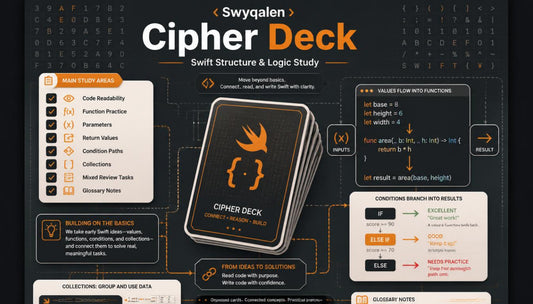
Cipher Deck
Regular price €119,00 EURRegular price -
Trail Framework
Regular price €174,00 EURRegular price






Learn on All Devices


Begin With a Sample Page
As Seen On


Look Inside the Learning Flow
Why These Pages Feel Different
-

Clear Modules
Each module guides learners through focused Swift topics with calm, organized study flow.
-

Practice Tasks
Practice tasks help learners review Swift examples through small, manageable coding study exercises.
-

Recap Pages
Recap pages give learners short reminders for returning to important
Swift ideas later. -

Code Structure
Code structure notes explain how Swift parts connect through readable study patterns.


